Matt Godbolt’s blog

WeeBox Project

It's Alive! (again!)

Well, it’s been a while since I’ve had time to work on the Weebox — and part of that’s due to the lack of a working LCD screen (covered amply in A frustrating evening). Yesterday morning this all changed with the arrival of the new, working, negative voltage generator.

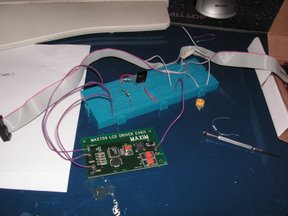
I’ve bought an LCD negative voltage generator evaluation board from Maxim IC. Rather than try and solder on all the tiny and hard-to-find components needed, I plumped for the cheating method of getting Maxim to do it for me. All I had to do was solder on the +5V, GND, Shutdown and Output wires — which even with my hamfisted soldering skills wasn’t too hard:

With the new board in place, I excitedly connected everything up, carefully ensuring the shutdown pin was low until initialisation had finished…then I ran my test program…

Looks like it’s working….kinda…but what’s with all the gaps? A quick look through the code and in my frustration the other night at it not working I’d introduced so many bugs it wasn’t even slightly working. A bit of fixing…and then a bit of fiddling in the GIMP, and I suddenly had this:

Hallelujah! After many months of bug-hunting, breaking things with too much solder heat, blowing up components, ordering the wrong things, paying import duty, swearing and cursing I finally had a working, graphical, 320 x 64 LCD screen.

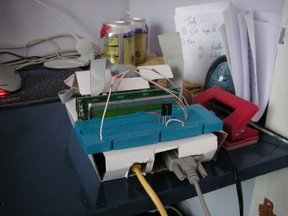
I was over the moon! I then spent the rest of the day making up a bit of breadboard with the components on instead of the mess of wires in the prototype board. Although in doing so I overheated the IR detector and fried that — oops it was all going a bit too well, another one’s in the post though. Once it was all settled in I turned to software matters again.

The LCD driver I was writing was in C++, but the Weebox stuff is in Python. I was tempted to rewrite the lot in C++, but the flexibility of Python is too hard to resist. A chat with a friend who suggested an RSS news ticker confirmed this: It would be a few lines of Python but reams of C++. However, I couldn’t implement the LCD driver in Python, it’s just not fast enough. So I had to bridge the two languages with SWIG — which turned out to be almost totally painless. After a few blind alleys I had a python-callable module that could initialise and clear the display and draw pixels, lines and filled rectangles.

By this time the poor 200MHz ARM wasn’t cutting it for compiling, the C++ code was taking minutes to build. An hour invested in getting SCons and the Arm cross compilation setup working on my PC was very well invested — the turnaround time now is seconds. I have the Weebox’s NFS root mapped as a Samba drive, so I directly edit and compile the code onto the Weebox’s disk in Visual Studio. Much faster, just F7 and an alt-tab to the Putty shell on the weebox is all it takes. Marvellous. With a bit of tweaking I could set the ‘debug executable’ on VS to be an rexec of the weebox, but that’s enough for now.

Latterly I started thinking about fonts. I was originally going to draw my own just like I always did on the Spectrum and Beeb all those years ago. However, I had a thought: 320x64 is enough for pretty decent-sized letters…why not use TrueType fonts? Within a few minutes I’d read the FreeType tutorials and I was ready to go. After a few false starts and a strange 1bpp bug (if you render a space in 1bpp mode FreeType seems to do a divide by zero on ARM), I had this:

As it’s just gone 11pm and I’ve not stopped since about 10am, I think I’m going to stop here. I need a good long think about how it’s all going to fit together, and how I’m going to optimise the TrueType rasteriser (which currently runs with uncached glyphs and plotting each pixel individually! yuck!) But it’s looking very promising. If only I hadn’t blown the bloody infra-red detector up, I’d have ‘final hardware’ at last. Oh well, should arrive on Tuesday, and then I’ll have a completed Weebox, just lacking in software.

Update: next day the new IR detector came…and in installing it I noticed that I’d put +5V and GND the wrong way round on my circuit plan…oops…I probably hadn’t toasted it after all. Anyway, I now have a ‘working’ final hardware Weebox, playing music, displaying stuff onscreen in pretty fonts and receiving commands from the IR display. Sadly I reckon Python’s not going to cut it after all, running just the screen screen at the moment is taking 30% CPU with nothing else going on, and that’s not enough to get OGG playback without clicks every now and then. Oh well!

Filed under: WeeBox Project

Posted at 22:51:00 BST on 12th August 2006.


A frustrating evening

This morning I was yet again rudely awakened by the DHL man. This time he brought me a DC-DC converter, to jump my 5V down to -12V ready for use in the screen.

My idea of electronics is somewhat out of kilter with the Universe’s, it would seem. So I’m researching on more alternatives to get my -9.1V that I need. The only circuits that I’ve seen use Maxim ICs, which RS don’t seem to sell, so I’m a bit stuck. I’ve found this but the issue is the 0V. When I measured my NMA0512S’s output at its three terminals (marked, -12V, 0V and 12V) relative to ground, I got 0V, 20V and 40V. I put a bit of a load on the system, and I couldn’t fathom out any kind of relationship between the voltages and the load…and when I got it nearly right (about -10V) plugging the LCD screen in immediately took the voltage back up to 2-3V. Aargh! Unfortunately, after some further mucking about I managed to blow the stupid thing, burning my fingers in the process (yes, they get really hot if you short them out…doops).

I’m sure this is obvious stuff, so I’ve resolved to go and buy an electronics book or two tomorrow and try and work out where I’m going wrong.

At least during all my experimentation I got a few pixels lighting up (or rather going black) on the screen, so hopefully that’s not entirely broken. I still do worry that I’ve cooked the screen though, and it’s going to take me ages to find that out, as I’m still no nearer a cheap, simple, easy, dependable -9.1V supply.

Update: Later that night I revisited Maxim’s website and noticed I could get free samples … so rather cheekily I’ve ordered a couple of MAX759s to play with and hopefully with their application circuit (which is specifically designed for LCDs) I’ll get some success. Scary how many capacitors and inductors there are on their circuit though, I need to get a shedload more components!

Filed under: WeeBox Project

Posted at 23:09:13 BST on 31st July 2006.


A new screen

It’s been rather a while since I’ve been able to spend any time on the Weebox, what with the Xania.org attack and with work and life intervening (damn them!) However, in the evenings I’ve been researching a new LCD display to replace the frankly quite rubbish 2x24 character display I’m currently using.

Before I go much further I have an admision to make…I’ve actually broken the 2x24 display. It was always a little sensitive to being pushed and pulled about, but after a recent attempt to ‘fix’ it I think I accidentally heat- damaged the underside. Only by bending the whole PCB by about 10 degrees could I get it to work — some solder joint has come undone somewhere. As the screen was never intended to be the final solution this just puhed forwards the point at which I replaced it.

I was looking for a largish screen to display song name, menus, volumes, status messages and the like. I wanted a rectangular screen and ideally a graphical screen instead of a pure character-based screen, so I could do all my favourite games-programmer whizzy effects. Importantly I also wanted something with as few pads to solder as possible (as my soldering skills are limited) and with as few differences from the existing board I had so I could use a lot of the existing LCD support.

After a lot of looking I found the MGLS-32064. It has an identical pin-out to the HD44780 and has a very similar driver chip, the HD61830. The screen is large and clear, and has a resolution of 320 by 64 pixels. With a decent font that means about 40-50 characters along — ample for my purposes. It also means about 8-10 lines of text; again more than enough. With 8K of character and screen memory it also means I can double-buffer the screen and do flicker- free updates.

I duly ordered the part from RS Electronics, and eagerly awaited its arrival. My original choice of LED backlight was sadly out of stock til November, so I plumped for the non-backlit version. Hopefully I won’t come to regret this decision! I also went to Maplin and bought a new soldering iron — this time temperature-controlled — and some ribbon cable and end-pieces to make my own cables.

The part arrived and that evening I set about soldering on the pins to the pads. The TS7250 board has an LCD header which provides most of the pins needed, but the chip select and reset pins needed wiring low and high, respectively. After a lot of practice on some stripboard I went on and soldered. Probably the best solderin I’ve ever managed:

All excitedly, and not without some trepidation, I plugged the board in (after first triple-checking the polarity) and turned on the Weebox. A brief flash of the screen (yay), then nothing, as you’d expect. I ran my test program, and I saw something very nearly akin to what I was expecting, some black lines on the screen (sadly I didn’t get a picture). After a bit more investigation and bug fixing in my driver program the screen suddenly went blank. A quick check and two of the wires had come unsoldered — oops.

I reaffixed the wires and double checked the pad connections using my multimeter, resoldering any that appeared a bit dodgy. Back to the board…still nothing.

Many hours of checking and double-checking and comparing with other people’s code and swearing then ensued. But still nothing on the screen. Eventually I wrote a unit test and was able to determine that I could write data to the 8K RAM and then read it back out again absolutely fine, and that I was correctly polling the BUSY flag and that the bit-set and bit-clear operations all worked. Everything on the digital side was working. Only nothing on screen. Tearing my hair out I re-read the less-than-helpful documentation. Oh…pin 3….it’s not really the same as pin 3 on the TS7250. Pin 3 is the VO ‘LCD driver voltage’ on the new display; on the previous screen it was a contrast adjustment. The two amount to the same thing, but whereas the contrast adjustment on the old screen was a 620 Ohm to ground, VO has to be something rather different.

From the spec sheet: ‘VLCD = VDD — VO : range from 14.3V to 15.3V’. Oh dear — a bit of maths indicates that VO has to be minus 9.3V!! A check on google groups confirmed this too, I needed to generate a negative voltage. I’ve mailed RS to tell them their info page is inaccurate — there it specifies the MGLS32064 has an integral DC-DC converter to do such an inversion. I’ve also ordered a 5V -> -12V DC-DC converter, and I hope that wiring that appropriately to pin 3 will bring my display back to life.

As for why I managed limited success at the beginning — I can only suspect that I had original not had pin 3 wired up at all. This in turn might have just fluked it into working, though I’m not sure how. I only hope that I haven’t blown the bloody screen somehow — though the two nearest components to the pad area are the 8K RAM and the controller chip; both of which seem to work fine in my tests.

I’ll be posting once I get any more information, see you next time on Clueless Fool Attempts Electronics! :)

Filed under: WeeBox Project

Posted at 10:36:16 BST on 28th July 2006.


The Ep93xx LIRC driver

As promised, I’m posting a patch here for LIRC to support an IR detector plugged into the EP93xx processor’s IO ports.

To apply the patch you’ll need to be able to build from LIRC’s CVS repository. Grab the latest lirc down and then get this gzipped patch. From there, apply the patch and build lirc. Detailed instructions:

weebox:/home/matthew/build/lirc# zcat ../ep93xx.patch.gz | patch -p1
patching file configure.in
patching file drivers/Makefile.am
patching file drivers/lirc_dev/lirc_dev.c
patching file drivers/lirc_ep93xx/Makefile.am
patching file drivers/lirc_ep93xx/lirc_ep93xx.c
patching file setup.data
weebox:/home/matthew/build/lirc# ./autogen.sh
processing /home/matthew/build/build/lirc
Running libtoolize...
...lots more output, takes a very long time...
daemons/Makefile.am: installing `./compile'
daemons/Makefile.am: installing `./depcomp'
Running autoconf ...
Creating setup-driver.sh ...
weebox:/home/matthew/build/lirc# ./setup.sh
[Choose Driver configuration / Other / EP93xx IO driver]
[Configure the software as you see fit]
[Save configuration & run configure]
setup.sh written by Karsten Scheibler, 1999-JUN-28
If you have problems or questions please consult the mailing list
Configuration: .setup.config, executable shell script: configure.sh
...lots more output, takes a fair while....
config.status: executing depfiles commands
You will have to use the lirc_ep93xx kernel module.
Now enter 'make' and 'make install' to compile and install the package.
weebox:/home/matthew/build/lirc# make
make  all-recursive
make[1]: Entering directory `/home/matthew/build/lirc'
Making all in drivers
make[2]: Entering directory `/home/matthew/build/lirc/drivers'
Making all in lirc_dev
make[3]: Entering directory `/home/matthew/build/lirc/drivers/lirc_dev'
...lots more stuff...
make[2]: Nothing to be done for `all-am'.
make[2]: Leaving directory `/home/matthew/build/lirc'
make[1]: Leaving directory `/home/matthew/build/lirc'
weebox:/home/matthew/build/lirc# make install
... lots of installation stuff...
weebox:/home/matthew/build/lirc# modprobe lirc_ep93xx
weebox:/home/matthew/build/lirc# mode2
[point remote at detector and press buttons]
pulse 459815
space 3943
pulse 606
space 900
pulse 597
space 1898
pulse 604
...and so on...

The infra-red receiver should be plugged onto IO pin 0 (though this is configurable at module load time). Please let me know how you get on if you try this, I’ll aim to deal with any features needed or bugs found.

Filed under: WeeBox Project

Posted at 14:04:00 BST on 15th July 2006.