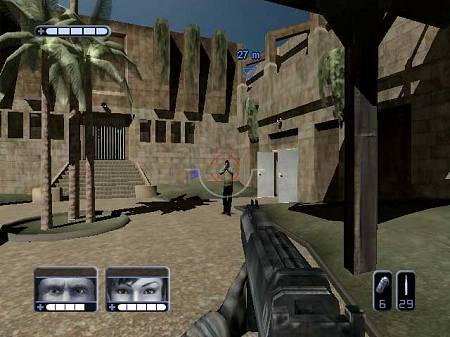
SWAT: the last few bits
This is the last post in my series on how SWAT: Global Strike Team was made. See the first article for more information on these posts.
In this post I’m going to blast through the remaining parts of the code. I was less involved with these so apologies for the vagueness; it’s been quite a while since I’ve thought about them.
Collision System
A collision system’s job is to determine quickly and effectively when dynamic objects intersect the scenery and each other and prevents you being able to walk through walls and so on. Importantly for a game like SWAT, our collision system also allowed us to trace rays through the scene and work out what they hit — used in the dynamic shadow calculation as well as to work out where all the bullets end up hitting.
The collision system and maths library used in SWAT were developed by Alex Clarke (now working at Google a few desks along from me). Thanks to Alex for helping me put this section together.
The collision mesh was typically the same geometry as the visible world geometry. It went through a simplification preprocess where co-planar (or very nearly coplanar) triangles were merged into concave polygons. This typically created larger polygons than were in the original source data as material changes could be ignore.
A KD tree (a way of cutting up the world into manageable pieces) was then constructed from these concave polygons, with partitions selected to reduce the number of edges introduced while trying to avoid cutting too finely. The resulting polygons were triangulated by ear cutting before being stored as triangle strips. On PS2 these were quantized to 16 bit coordinates. The run-time code that processed them ran on VU0 in hand-coded assembler. On Xbox the implementation was a mixture of assembler and C++, the latter using lots of intrinsics.
Dynamic objects were modelled using a collection of spheres which were stored alongside the normal geometry. To account for their motion and to ensure fast moving objects can’t “tunnel” out through walls, spheres were effectively swept along a line into “capsules” (the same shape as a pill or a sausage) before being intersected with the landscape. It turns out the maths behind intersecting a capsule against a triangle is really complex. We actually extruded each triangle by the sphere radius, turning it into two larger triangles and three capsules, one for each edge. We would then intersect the ray corresponding to the line segment in the centre of the original capsule against this expanded world.
An object (on the left), moves to a new position on the right. There is a solid object (the line) in between them, so we need to find the collision point (shown as a red circle).
In order to find the collision point we sweep the object from the start to its end point and collide this swept sphere (shown here in 2D as a swept circle) with the solid object.
For simplicity, the motion of the object is considered to be a line, and the solid object is expanded out by the radius of the moving object. The line is then intersected with this expanded object to find the centre point of the collision.
If the ray intersected the expanded world, a new direction vector parallel to the intersected surface was computed and a new ray recast in that direction from the intersection point. in the case of multiple collisions the line was never allowed to curl back on itself.
Collision was performed in two passes; a broad and a narrow phase. In the broad phase, large areas of potential collision were quickly found (the leaves of the KD tree). In the narrow phase the individual triangles were tested for intersection against the rays and spheres.
There were some batch optimizations too — for a bunch of related ray casts (e.g. multiple shots from a shotgun), we passed all rays through the broad phase, then for each KD leaf we would run ray-triangle intersections. More ray-triangle intersections would be made than were actually needed, but as the setup cost for each node was high compared to the intersection calculations it was a win overall.
Physics System
The physics system determines how objects move as a result of the forces applied to them. In SWAT objects moved with fake scripted physics or with very simple ballistics.
In SWAT 2 (which became Urban Chaos: Riot Response) we used the commercial Havok library for dead bodies and ballistic objects). This was fairly painless (minus a few nasty memory leak problems on our side of things), though we dedicated an engineer (Mustapha Bismi — now at DarkWorks) to making sure everything integrated nicely and worked well in the game.
Portal System
The Xbox’s pixel counting system in the Z stamp pass turned out not to be quite effective enough. Plus, the PS2 didn’t have that technology, so a quick way to work out what chunks of the map were potentially visible from a given camera location was needed. Jon Forshaw (now at PKR) implemented a portal system to help. Each region of map had its “prtal” areas tagged — these being areas which had line of sight through to another area of map.
Imagine two rooms separated by a long, thin corridor. We would break the map into three regions (the two rooms and the corridor) separated by two portals (the doorways between the rooms and the corridors). The portals were rectangular regions covering only the doorway area.
At run time we would find out which region the camera was in, then see if any of the portals were visible. We would only draw the map region on the “other side” of the portal if it was. We’d then check that region’s portals — clipping them against the viewable area of the original portal — and only draw them if they were visible too.
This meant in the room example:
- If you were in one room facing away from the corridor, we’d quickly work out only to draw the room you’re in.
- If you were in one room and you could see the corridor entrance, but not all the way through the corridor to the other room, we’d just draw the room and corridor.
- Only if you could see through the corridor all the way to the end and into the other room would we draw all three regions.
Judicious use of “dogleg” corridors in between large sections of map could drastically reduce the amount of map drawn.
Voice Recognition
One of SWAT’s unique selling points was the ability to order your two buddies around with voice commands. We investigated writing our own voice recognition stuff, but frankly it was a bit outside our area of expertise. We ended up buying in solutions: (ScanSoft’s GSAPI on PS2 and Fonix Speech on Xbox.
However, the ground work we did in voice recognition (phoneme recognition) was picked up and used to help do lip synch in some other games, so the effort wasn’t completely wasted.
Artificial Intelligence and Scripting
Our AI system was developed in house by Chris Haddon (now at Microsoft) and Matt Porter (now at Sony Cambridge). It was a multi-layered system where the lowest level was responsible for things like scheduling animations to be played — “start running” animation followed by “run loop” animation, for example. A goal seeking layer in the middle chose which of potentially several goals were best to attempt given the current situation. Running on the top was a script system which our level designers could interact with to set the goals in the first place.
There was a huge amount of complexity in the AI system, but unfortunately I really don’t know much more.
Regrets and Conclusion
Bit of a miscellaneous thing to add on, but having thought about it I thought I’d mention what I thought we did wrong:
- Shaders. I spent ages developing the shader compiler, interpreter and optimiser. I had a whale of a time, but ultimately the power of the shaders was never used; partly as the tools made it hard (and our artists didn’t have time to learn my made-up shader language), and partly as we had to support the PS2 engine which had none of the loveliness available to it.
- Tools. As cool as it was, FileServ’s file-server-cum-makefile-system-cum-converter-cum-kitchen-sink approach probably wasn’t wise. In a lot of cases we ended up making requests to it, and then stealing the converted resources out of its cache. Having the asset build system separate might have been more sensible.
- Global Illumination. Looking back at the screenshots I can’t help wondering if we really made the right decision about our lighting. I love our razor-sharp shadows and the ability to monkey with the lighting settings in realtime, but it would have been even better if we could have factored some global illumination (radiosity or photon mapping) into the renderer somehow.
- Technology Sharing. There was some amazing tech in Argonaut at the time which we could have potentially used. One thing was Alex Clarke’s cool resource system, which could have allowed us to do dynamic editing and given the artists and designers better tools to generate assets with. We had some primitive “fast reload” for models and shaders, but Alex’s system could allow individual models to be swapped out and replaced while the game ran.
Having spent a lot of time on these blog posts, and finding some code snippets of Okre around, I’m still immensely proud of what the team produced. Making SWAT was one of the best times in my life, and although it was only lukewarmly received, I still think it’s a fun game.
Maybe some other time I’ll bang on about my favourite game to work on — Red Dog.
Filed under: Games
Posted at 19:05:00 BST on 16th April 2010.
Rendering in SWAT: PlayStation 2
Last time I went into considerable detail about how Okre’s Xbox renderer worked. In this post I’m going to explain how we got Okre running on PlayStation 2.
The PS2 was a powerful but limited machine. Its speed at rendering to the screen was unsurpassed at the time, but the blending it could do was very limited indeed. Where the Xbox could sample up to four textures and blend them arbitrarily with each other and the current screen contents, the PS2 could only sample a single texture, and either add or alpha blend with the screen. In terms of per-vertex calculations, the PlayStation 2 had a general purpose processor (called VU1) to process vertices, compared to the Xbox’s vertex shader which had a limited instruction set.
As mentioned in the introduction, we were able to leverage Argonaut’s existing PlayStation 2 technology, notably the code that ran Lego Bionicles and I-Ninja1. This meant the most complicated parts had already been written — notably the clipper which was a masterpiece of assembler by Carl Graham (co-designer of the SuperFX chip). The Xbox clipped geometry in hardware whereas the PS2 had to use software clipping, and would crash horribly if got it wrong and let it draw too far off the sides of the screen.
The PS2 had an unusual feature — it supported two separate hardware rendering contexts. A context held settings like texture modes, blending modes, render target and so on. At render time, a triangle could be submitted through either render context. Okre used this to perform lighting and texturing at the same time for dynamic objects: one context had the settings for the texture of an object, the other had the lighting settings. The lighting context was set to add to a different buffer, so by the end of the texturing and lighting pass we would have two screen-size buffers: one would have the unlit, textured scene, and the other with the lighting.
Of course we needed separate separate passes for the scenery geometry, as the lighting geometry was unique for every light. In the case of dynamic objects we could transform and clip all the triangles, and then just submit it to the rendering hardware twice, once per context. This made the lighting reasonably cheap.
Before rendering we initialised the lighting buffer to the ambient colour. Then we added on any self illuminated surfaces, as we did on the Xbox. The PS2 hardware didn’t have all the clever pixel-counting and early outs for Z failures, so we had no “Z stamp” pass.
Because the PS2 didn’t have any per-pixel calculation ability, we couldn’t use bump-mapping2. It also didn’t have 3D textures, so we needed a different way to calculate light falloffs. As the geometry was shared between Xbox and PS2, we had to have a fairly similar lighting function to the Xbox version so we didn’t cause the artists and designers too much pain.
Our solution was to use a 2D texture for falloff, using a fairly simple linear distance-based falloff of 1-sqrt(x*x+y*y). For each triangle, we calculated the plane it was lying on, and considered it to be a planar slice through the sphere of influence of the light. We projected the appropriately scaled coordinates of the triangle onto the plane, and used them as the U and V coordinates of the texture lookup. The distance from the triangle’s plane to the sphere’s centre was used to dim the light’s colour based on distance, and the resulting value used as the vertex colour3. The rendering hardware then looked up the texture per pixel, and multiplied it by the vertex colour giving a final attenuated colour ((1-sqrt(x*x+y*y))*(1-z*z))4. All this could be precalculated for static scenery and lights. For dynamic lights, the same calculation was made in a shader, making them slightly slower.
This is a pretty good approximation of the real function, only really failing on smooth curved objects where each triangle’s plane may have been slightly different to its neighbours, giving possible continuity problems. This turned out not to be too much of a problem as we didn’t have too many smooth shaded surfaces.
Specular lighting was limited, and basically involed another pass adding on an environment mapped “light highlight” texture.
Combining the buffers
The tricky bit then came as we needed to combine the textured scene with the light buffer by multiplying the two together. Unfortunately the PS2 doesn’t have a multiplicative blending mode: the best it can do is multiply textures by a constant value and by either alpha or (1-alpha). Even worse, its idea of “multiplying” two values together is actually (x * y) >> 7 — that is, the result is double the value you’d expect. (Multiplying two 8-bit values together gives a 16-bit answer, and usually you’d shift this back down 8 to get an 8-bit answer out). This “feature” allows you to brighten things by up to 2 times during lighting (for mock specular effects), but actually throws one bit of accuracy each multiply. Aargh!
Thankfully the creative chaps at Sony had published a cunning way to get around these limitations5.
The trick is to “lie” to the hardware about the type of texture you have. By pointing the texture unit at the 32bpp light buffer, but saying “hey, it’s an 8bpp palettized texture”, it was possible to read just one component out (i.e. either red, green or blue). Setting an appropriate palette of (1 in either red, green or blue as appropriate, and index/2 in alpha) would then look up the 8-bit value and get a neutral colour with an alpha value of the “actual” amount. This would be used by the hardware as the value to multiply with, and so you’d get a single component multiplication. Repeat this for green and blue and you’ve done a full screen multiply.
This was made even more complex by the fact the layout of the buffers was not a contiguous ARGB, nor a simple planar format. Instead, when interpreting a 32bpp screen as if it were an 8bpp texture you saw a 16x4 block of pixels for each 8x2 source block:
| 0 | 1 | 2 | 3 | 4 | 5 | 6 | 7 | 0 | 1 | 2 | 3 | 4 | 5 | 6 | 7 |
| 8 | 9 | 10 | 11 | 12 | 13 | 14 | 15 | 8 | 9 | 10 | 11 | 12 | 13 | 14 | 15 |
| 4 | 5 | 6 | 7 | 0 | 1 | 2 | 3 | 4 | 5 | 6 | 7 | 0 | 1 | 2 | 3 |
| 12 | 13 | 14 | 15 | 8 | 9 | 10 | 11 | 12 | 13 | 14 | 15 | 8 | 9 | 10 | 11 |
The colour of each cell indicates which of the four components (red, green, blue or alpha) is stored, and the number indicates which pixel number is stored in an 8 by 2 block of pixels.
Note how the order of pixels 0-7 shifts on the second row, wrapping around by 4. On the next block of pixels this pattern was reversed again, so the subsequent block of pixels has its red and blue pixels rotated by 4, and its green and alpha are stored in linear order.
Selecting a single component from the buffer (when the buffer is viewed as an 8bpp texture), means crafting thousands of quadrilaterals that cherry-pick the right part for each component. We took advantage of the fact the pattern repeated regularly, and so could prepare a set of rendering instructions offline for a single screen block, and reuse that over and over again, just moving the source and destination texture pointers as appropriate. All this could happen on the VU1 chip, leaving the data bus free for the CPU while this operation occured.
Shadows
Apart from the pre-calculated scenery shadows, we couldn’t come up with a viable way to do true dynamic shadows on PS2. There’s no stencil buffer or depth buffer support on PS2 and although there are some tricks to achieve both they’re both very expensive. We were already burning so much processing power doing our lighting so we decided against implementing them.
Instead we went with the more game-y black circle shadow drawn under the characters. Using the collision system, we’d find out where the floor was under the characters, and just plonked a shadow circle there. For shadows cast onto the dynamic objects, we did a ray trace (also using the collision system) of several rays from the objects to their nearby lights. The result of this would be an approximation to how much in shadow an object was, and we darkened the whole object accordingly.
Full screen passes
To get the final image we had a number of full-screen passes, like the Xbox:
- In order to get the camera effect (virtual aperture and exposure), we used a similar technique to the multiply trick to look up the red, green and blue component of the screen in an exposure table.
- The colour bleed effect was one of the easier things to port over: the PS2 supported subtractive blending, so we could threshold the brightest pixels. Then downsampling, re-upsampling and adding was just texture manipulation and additive blending.
- Sampling the brightness of the screen to feedback to the camera effect involved downsampling the screen until it was very small (around 32x32), and then transferring this small texture back from the graphics unit to the main memory where the CPU could read it.
Other stuff
Invaluable in the development process was the PlayStation 2 “Performance Analyser”, which was a gigantic, instrumented PS2 development kit. As far as I can tell it was a normal PS2 with a bunch of very fast RAM and hardware logic probes on all the bus signals. Triggered by a foot switch it would capture all the main signals going on for a whole frame. An application running on the developer’s PC would then let you visualise the captured data. This was handy for finding and fixing bottlenecks, and also at a push for working out why geometry wasn’t turning up in the right place. It required a pretty comprehensive understanding of how the PS2 worked though.
A Performance Analyser scan. It’s the only one I could find: it’s not actually of SWAT, but of Lego Bionicle’s “Depth of Haze” effect. From left to right it shows the graphics commands executed; the location of the last branch the CPU executed; time series of the various control signals; key to the graph. The CPU is actually in a busy spin waiting for the GPU (note the branch panel shows the same locations over and over and the CPU graphs (green at the top) indicate 100% CPU usage - only really achievable in a tight loop with no external dependencies. The rest of the graph is pretty incomprehensible without going into another chapter’s worth of post here.
The Xbox had an equivalent system, except instead of being a very expensive piece of hardware, it used software instrumentation to capture essentially the same data although not at the detail of the PS2. The Xbox’s equivalent went on to become DirectX’s PIX, although it was much more powerful owing to the tool knowing exactly what graphics card it was running on. This meant it could do things like display the captured frame and then allow you to click on a pixel somewhere and tell you exactly how that pixel came to be rendered the colour it ended up — which polygons drew over it, what blending modes and textures were used and so on.
Next time I’ll cover some of the other parts of the engine, probably the collision and AI.
-
Argonaut had the first PlayStation 2 in the UK, and we developed a pretty complete demo of a game called “Cash on Delivery”, which was a Crazy Taxi-like game. Sadly nothing came of it. ↩
-
Though there are some amazing hacks to get bump-mapping on PS2, we didn’t use any of them. ↩
-
Staggerinly, the PS2 didn’t interpolate its colours taking into account perspective. This meant we had to be careful to minimise the colour change over larger polygons, particularly if they were next to smaller polygons where it would be more noticeble that the colour interpolation was completely different in each case. ↩
-
I can’t remember how we dealt with normals. I think we just factored them into the colour, but due to the lack of perspective correct colour interpolation something tells me we may have actually ignored normals. ↩
-
I have a theory that part of the success of the PlayStation consoles comes from their complexity to program and their insane limitations — this gives a gradual increase in game quality as developers learn new tricks the quality improves, giving the console a long lifetime. Gamers see continual improvements in game quality. Compared to Xbox say, where there doesn’t seem to be as big a difference between the quality of first-generation games compared to the later ones. ↩
Filed under: Games
Posted at 09:15:00 BST on 31st March 2010.
Rendering in SWAT: Xbox
In this post I’ll talk a bit about how SWAT: Global Strike Team’s rendering system worked. For more of an overview and the other posts in this series, see the introduction. SWAT’s renderer was born and bred on the Xbox, so first I’m going to explain how our Xbox renderer worked. I’ll save how we crowbarred this onto a PlayStation 2 for the next post.
Xbox rendering pipeline
Okre used a pretty standard lighting model (called Phong shading), where light is considered to come from three sources:
- Ambient light: a constant amount of light received by all surfaces. It approximates the general background amount of light that’s bounced everywhere. A little like the light you get on a cloudy day; it has no obvious direction but just lights everything evenly.
- Diffuse light: a contribution from each light that depends on the distance from the light and the angle between a surface and the light. The more directly the light hits the surface, the brighter it is. A surface for whom the light only just grazes is hardly lit at all.
- Specular light: the “shiny” part of the lighting, sometimes called specular highlights. It depends on the distance from each light, and the angle between the camera, the light and the surface. It represents the light that bounces directly off the surface straight into the camera.
Okre’s overall lighting and texture for a single point on in space was, roughly:
// What colour (RGB triple) should we render a point,
// given its position, normal and shader.
Colour ColourAtPoint(Position p, Normal n, Shader s) {
// Start out with a constant ambient colour, plus
// the shader's contribution (its "self illumination")
Colour diffuse = kAmbientColour + s.SelfIllumination();
// Okre had a limitation of a monochrome specular
// component in order to fit the diffuse and specular
// into a single 32-bit colour value.
float specular = 0.f;
for (Light l : lights) {
diffuse += l.Diffuse(p, n);
specular += l.Specular(p, n, s.Shininess());
}
// The call to Shade() here runs the shader, sampling
// textures etc, blending them and returning a colour.
Colour colour = diffuse * s.Shade();
// Add on the specular contribution.
colour += specular * s.SpecularColour();
return colour;
}
This routine was effectively run for every visible pixel in the game. The Xbox had fairly flexible graphics hardware capable of doing all these calculations, but its pixel shader unit only had space for a very limited number of instructions (between 8 and 16). There’s no way that we could have fitted ColourAtPoint into a single shader2, so we had to split the process into several stages, some requiring the world and object geometry to be drawn multiple times, and others being single full-screen passes.
The rendering process for a single frame went something like:
- Clear the screen.
- An ambient and “Z stamp” pass.
- Several lighting passes, one per light.
- A single texturing pass.
- A specular application full-screen pass.
- A gamma remapping full-screen pass.
- A colour bleed full-screen pass.
I’m going to use a rather unusual image to demonstrate how the final picture was built up. My artistic skills are limited, but I built it using the same steps as Okre would have used. There are three lights, a flat cube with a picture on it, a shiny bumpy sphere and a tiled background, the tiles having a “xania” motif on them:
Ambient and “Z stamp” pass
First the screen was cleared to a constant colour (the kAmbientColour of the above routine, with an alpha of zero.) The Z buffer3 was also cleared at this point.
Next, we used a few Xbox-specific features: the ability to count the number of pixels actually rendered, a fast rendering mode when texturing was disabled, and its fast hierarchical Z buffer4 which allowed it to quickly reject pixels that are behind previously drawn surfaces. We sorted the geometry so that the first things drawn were nearest the camera. For each chunk of geometry we also count the number of pixels actually drawn. For surfaces with default ambient settings, we only wrote to the Z buffer. For surfaces with a different ambient setting (e.g. a self illumination texture), we also added their ambient value onto the screen.
At the end of this pass:
- The Z buffer has been set to its final value. Any further rendering can turn off Z writing, which speeds up rendering a little. The front to back sort, plus the fast reject mode, means that geometry hidden behind other geometry is virtually free to render.1
- The screen buffer contains the ambient contribution of every pixel (
kAmbientColour + s.SelfIllumination()). - For each chunk of geometry, we know how many pixels were actually rendered. As we’ve sorted front to back, anything that was completely obscured will have a zero pixel count. If this is the case, we now know that we don’t have to render this chunk of scenery again this frame. This gives us screen-space visibility set culling. However, as the graphics processor runs asynchronously with the CPU, we need to block here while we wait for the pixel count results to come back. This is the point where we ran the AI code on the CPU while we awaited these results.
Lighting passes
If you could see the screen buffer now it would look pretty bland. In most cases it would be a constant, very dark grey. There might be a few bright streaks near the top of the screen where strip lights have been drawn — they would have had a self illumination map where the strips were painted in bright white.
The lights that affected the currently visible scene were found — any lights whose sphere (for omnidirectional lights) or cone (for spotlights) of influence overlapped the visible frustrum.
Then a lighting process was repeated for each of the lights.
Shadows
First, the stencil5 buffer was cleared. Then a special rendering mode was used on all the dynamic objects that cast shadows: using some vertex shader tricks the original geometry of the shape was distorted and extruded away from the light into being the shadow volume of that object. The pixel renderer was set only to update the stencil buffer, and to increment it for all front-facing polygons, and decrement it for all back facing polygons6. This has the net effect of cancelling out for all pixels except those in shadow, which would be left with a non-zero stencil value.
Next, the offline precalculated per-light geometry (remember this from an earlier post), was used to add the light’s influence to the screen only where the stencil buffer is zero. This beautifully combines the offline calculated static scene geometry’s shadows (where shadow areas aren’t even present in the geometry), with the dynamically generated shadows (where per screen pixel we know if that pixel is in shadow or not).
This covers the shadows from dynamic objects being cast onto other objects. However, we also handled shadows being cast from the scenery onto the dynamic objects. Given that the scenery information is heavily preprocessed we couldn’t use the same system for the moving objects. In this instance we used shadow buffers. For each light and dynamic object pair, we stored a texture holding a render from the light’s point of view, looking at the dynamic object. This texture only stores the Z buffer of the render: that is, for each pixel of the texture it stores how far away the nearest surface is from the light in the direction of the object.
Then when it came to rendering the dynamic objects we’d also work out for each pixel of the object which pixel of the shadow buffer corresponded to a ray going from the object to the light. We could calculate the distance from the point on the object to the light; and if the value in the shadow buffer was less than this value we knew there must be a piece of geometry between the light and the object and thus it was in shadow.
Calculating the shadow buffers was an expensive operation, so we had a series of different resolution caches, and deliberately rendered an area wider than was strictly necessary for each object. That meant the same shadow buffer could be used for as long as the object didn’t physically move too far, which was generally the case.
For further reading, see “shadow volumes” and “shadow buffer” on Wikipedia.
Texture lookups
The light’s influence was calculated per pixel using a complex set of vertex shader, pixel shader and texture operations. The Xbox supported reading from up to four textures at once, and it also had support for 3D textures and cubic environment maps.
3D textures are exactly what they sound like: an x by y by z array of colours. Obviously, being cubic in size makes them quite large. In SWAT we used a 32x32x32x8bpp texture, and in it we stored a map sampling the fall-off function of the light. This function is generally fairly complex, involving a quadratic falloff7, so it’s too expensive to calculate per pixel. Instead we mapped the position of each pixel in 3D into a position relative to this map, so that 0, 0, 0 corresponds to the a point directly on top of the light, and 1, 0, 0 maps to a point at the very extent of the light (in the X direction), and so on. Then sampling the texture at this point would give the brightness component of the light due to the distance of that point from the light. The bilinear filtering that the texturing hardware does means the relatively low-resolution texture doesn’t look blocky.
The cubic environment map is a slightly odd thing: it’s actually a set of six textures, conceptually arranged as the faces of a cube. When sampling from such a map, the texturing hardware considers the 3D U, V, W coordinate given to it to encode a ray vector. A ray is shot out from the centre of the cube in the direction of the vector, and the texture colour of the part of the cube where it intersects is sampled.
The original intention of these maps was to give a nice way of doing reflective objects (environment mapping), where you would draw the scene as seen from the point of view of the reflective object into the six textures. Then when rendering the object itself, you’d use the reflection of the object’s surface normal to sample the map, giving a shiny-looking result.
However, we didn’t use the map in this way for lighting. Instead, we created a special cubic map where for each of the pixels of the six texture maps we store a colour representing the normalized vector in the direction of that pixel. Then during lighting we can passed in the normals of the vertices into this map, and this texture lookup re-normalizes the vector. This allowed us to linearly interpolate the vertex normals (which is technically incorrect), but then re-normalize them per-pixel (to get back the “right” value). We also used the map to normalize the vector from the camera to each point on a surface, used in calculating the light reflecting back towards the camera (the specular highlights).
Each surface could have a bump map: a texture which encodes the surface normal8. This allows otherwise flat surfaces to appear to have a bumpy appearance. For example, a large tiled wall could be drawn as a single flat polygon with both a texture map of the tiles, and a bump map of the tile normals. The grouting between the tiles means the edges of the tile “stick out” a little, and so the top edge of the tile tends to catch more light than the rest of the tile. In Okre, we also stored how “shiny” each pixel was in the bump map: the alpha of the colour encoded this information. In the tile example, the tiles are much shinier than the grouting between them, so we’d factor that into the map too.
The normal stored in the bump map was always stored as if “up” was in a particular direction, usually y being up. This is fine if the object you’re applying the bump map to is facing “up”, but most objects can face in all directions. Going back to our tiled wall, in a corridor with the tiled wall on both sides, you’d want to use the same bump map on both walls, but on one wall the normals need to point in one direction, and on the opposite wall they need to point in the opposite direction.
To account for this issue, we stored an “orthonormal basis” for every vertex in the scene. This is a transformation for that vertex which takes a normal stored in bump map space into the space that the model was designed in. Fortunately, determining the orthonormal basis for every vertex is something that could be done in an offline preprocess, though is does mean storing a 3x3 matrix per vertex.
Per-pixel lighting calculation
So, armed with our various maps (3D light attenuation map, cube map normalisation map, bump map), and our per-vertex information (vector to the camera, orthonormal basis, vector to the light) we can calculate the lighting.
For each pixel, we look up the bump map, transform it into model space using the orthonormal basis, and then use that as the normal for the lighting equation. The vector to the light is looked up in the normalisation map and then reflected by the normal to get the direction the light’s rays would bounce at this point.
The vector to the camera is also looked up in the normalisation map, and then the dot product between these two values is taken: this gives the cosine of the angle between the two vectors and so will return a value close to 1 when the light is bouncing straight at the camera, slowly fading to zero at a 90 degree angle away from the camera. This value is raised to a power and then used as the specular amount. The power detemines how “shiny” the object appears: high values will give a tight, focused highlight, lower values a more matte effect. The alpha component of the bump map is multiplied in too, giving some per-pixel control over the areas that are shiny or not.
The transformed bump map normal is also dot producted directly against the normalised light direction and used as the diffuse contribution of the light. The final output of the pixel operation is to add the light’s colour times the diffuse amount to the colour of the screen, and then add the specular component to the alpha part of the screen.
This rather lengthy process was repeated for each light. One advantage was that the number of state changes between surfaces was kept to a minimum: only the bump map and a few constant values (e.g. the light position) changed between rendering of lights, so despite its complexity it ran pretty fast.
If you could see the screen now, you’d see an untextured diffuse lit scene. All the lights’ influences have been added to the ambient from the ambient pass, and the shiny specular part is hidden away in the alpha component of the screen. In the test scene I introduced earlier, the screen would look like:
The contents of the red, green and blue channels after lighting, but before texturing.
The contents of the alpha channel.
Texturing pass
Compared to the lighting pass, the texture pass was pretty simple. For every object on screen, we ran its precompiled shader to get its final colour at each pixel, and then multiplied this with the screen, ignoring the on-screen alpha9.
At the end of the textuing pass, we have a fully textured, diffuse lit scene. The alpha channel is unaffected in this pass.
The textured, lit buffer (just showing red, green and blue).
Full screen passes
The final few stages of the renderer operated on the whole screen, running a pixel shader that read the current colour at each pixel, processed it, and then wrote it back. The passes were:
Specular application
Remember that so far we’ve calculated the monochromatic specular component of the lighting and written it into the alpha of each pixel, but it’s invisible. In this pass we simply add the specular alpha value to the red, green and blue colour components. At the end of this pass you’d see a fully lit and textured scene.
The results of adding the alpha channel to the red, green and blue. A fully lit scene.
Gamma remapping
Based on the virtual camera’s aperture and exposure settings and gamma settings we calculate a mapping table for red, green and blue values. Each pixel would be looked up in these tables. At the end of this pass, the scene would have the very dark parts become black, and parts brighter than the current aperture and exposure could epxress would have been mapped to white.
Colour bleed
To simulate the very bright areas bleeding out we apply a bleed filter: first we copy the screen out to another buffer, and while doing so discard any pixels below a threshold intensity, replacing them with black. This buffer then holds just the very bright areas of the screen.
Just the brightest parts of the scene.
We progressively shrunk that buffer down into other buffers, reducing the intensity each time. This leads to a series of images, each darker, and smaller than the previous. Adding these all back together (with appropriate scaling) gives a highly bled-out representation of the high intensity parts of the original screen.
Just the brightest parts of the scene, this time blurred.
This is then added back onto the screen, giving us the final image.
Endnotes
That explains the majority of how the Xbox renderer worked. I’ve been a bit vague on some details: if you can bear more in-depth explanations please contact me and I’ll happily go into any amount of detail.
Next time I’ll go into how we managed to get this very texture heavy and pixel and vertex shader dependent system onto a Playstation 2 — which has very limited texturing and blending capabilities.
-
In fill-rate cost anyway. ↩
-
Though nowadays on DX10 hardware you probably could! ↩
-
The Z buffer is a screen-sized buffer that stores the distance that each pixel is away from the camera. It’s used to work out when a pixel about to be drawn is in front of or behind the current pixel on the screen. ↩
-
This holds extra information per 4x4 block of the screen, storing the minimum Z value within this block. During coarse rasterisation, the Z extent of a whole 4x4 block can be compared against this single value, and the whole block can be discarded if it’s completely behind the current block. ↩
-
The stencil buffer is a simple 8-bit value for every pixel on the screen, typically to store temporary results during real-time shadow calculation. ↩
-
Actually it was more complex than this, using z-fails instead of z-successes for updating the buffer to solve a problem when the camera is inside the shadow volume. ↩
-
Okre used a
(1 / (1+8d2) + ¼)(1-d)falloff for omnidirectional lights. For spot lights, we used a two-dimensional circular falloff texture, and applied a distance falloff using the vertex shader. ↩ -
The mapping was pretty simple; the red, green and blue texture colour encode the x, y, and z of the normal, with `0x00` being -1, `0x80` being 0, and `0xff` being +1. An aside: some platforms, e.g. the Dreamcast used spherical polar coordinates for their bumpmaps. ↩
-
Transparent objects were handled completely separately and were a nightmare, so I’m not going to go into too much detail here. This is already far too in-depth! Essentially they were sorted and lit differently and put into the scene afterwards. ↩
Filed under: Games
Posted at 22:15:00 GMT on 21st March 2010.
SWAT's lighting system
This is part three of my game development posts, following on from my post on the artwork in SWAT.
One of the most novel aspects of Okre was its treatment of lighting. We wanted to take full advantage of all the cool pixel and vertex shader technology at our disposal on Xbox, so per-pixel lighting was a given. Additionally, from a game point of view we wanted to be able to let the player shoot out the lights to plunge the enemies into darkness, so that was another consideration. Finally, we wanted a proper shadowing solution that didn’t rely on the texture-based solution of the time — lightmaps, as used in Quake and so on. We didn’t think we could store all the lightmaps for a single level in memory, as our levels were outdoor and rather sprawling.
With that in mind, we considered generating the static scenery shadows geometrically. Nik worked his magic and came up with a solution. In a lengthy, offline process:
- For every light in the game, find all the scenery triangles that face the light and are within that light’s range.
- For each triangle, calculate the shadow volume that it casts. Clip all other triangles against this volume, and discard the parts that are inside it.
- Process and store this set of triangles as another piece of geometry, creating triangle strips and so on.
- This data will be used to draw the geometry lit by this light, where each light’s contribution to the scene is added on one after another. This is described in detail in my next post.
A triangle casts a shadow onto two other triangles.
The shadow region is cut out, leaving only the areas in light.
So we end up with a lot more geometry, one piece per light per chunk of original scene geometry. This sounds simple enough but it was hugely problematic:
- Double floating point precision wasn’t good enough. Repeatedly clipping tiny slivers of triangles against each other can cause them to turn ‘inside out’, where precision errors cause an anticlockwise triangle to become clockwise. It can also leave almost infinitessimally small polygons.
- The sheer amount of work involved: hundreds of lights in a landscape of hundreds of thousands of polygons.
Nik came up with some great solutions to these problems:
- Every edge was given a unique 64-bit id. During clipping this edge id was preseved and later used to discover triangle edges that were on the same original edge. These could then be welded back together after all the clipping had been performed with no loss of accuracy.
- We distributed the geometry calculation across many machines.
- Light geometry and its resulting shadow scape was heavily cached between conversions. A hash of the light position and the geometry it could potentially affect was used as the cache key. An artist or designer moving one light a little, or editing a few triangles only caused the recalculation of a small area of the map.
There were still a few cases where the algorithm didn’t work: usually because of broken source artwork. It was left to the artists to fix up the geometry to get the level converting correctly — removing coincident triangles, welding nearly-identical vertices, fixing non-manifold1 edges.
These shadows were great, being relatively cheap at runtime, but they were limited to static scenery and non-moving lights. We could vary the intensity and colour of lights at runtime, but not their position. They also lent themselves well to the PlayStation 2 engine which — if you recall from my earlier post — was a bit of an afterthought.
However, Okre also supported realtime shadows on the Xbox, using a stencil-based approach. In the final cut of SWAT — much to my and Nik’s annoyance — the character shadows were dropped due to a perceived speed problem. They were expensive, particularly on the skinned, animating characters. But they weren’t bad enough to drop them entirely (as far as I recall, anyway)!
I’ll go into how the light polygons and stencils were actually drawn in the next post, where I’ll cover the rest of the rendering engine too.
Another cool feature of the lighting system was its simulation of a real film camera. After rendering, the entire screen was post-processed to simulate film’s non-linear response to light and the “aperture” of our virtual camera. A further post-process would bleed out very bright areas. We sampled back a set of pixels near the centre of the screen every frame, and used this to adjust the aperture for the next frame, simulating auto-exposure.
Looking out from a relatively dark area into the bright outdoors.
When the player went from a dark room to the bright outside, this would momentarily dazzle them until the aperture closed a little. Glancing back at the dark room, the player would then only see a pitch black area, just as in real life. A similar effect was also used to simulate the temporary dazzling caused by the bright light of a flashbang grenade.
-
Non-manfold edges are where more than two polygons share the edge. A little like the pages of a book where the spine would be non-manifold. ↩
Filed under: Games
Posted at 07:55:00 GMT on 11th March 2010.